WooCommerce Product Designer Tool
Design Custom Products. Inside WordPress.
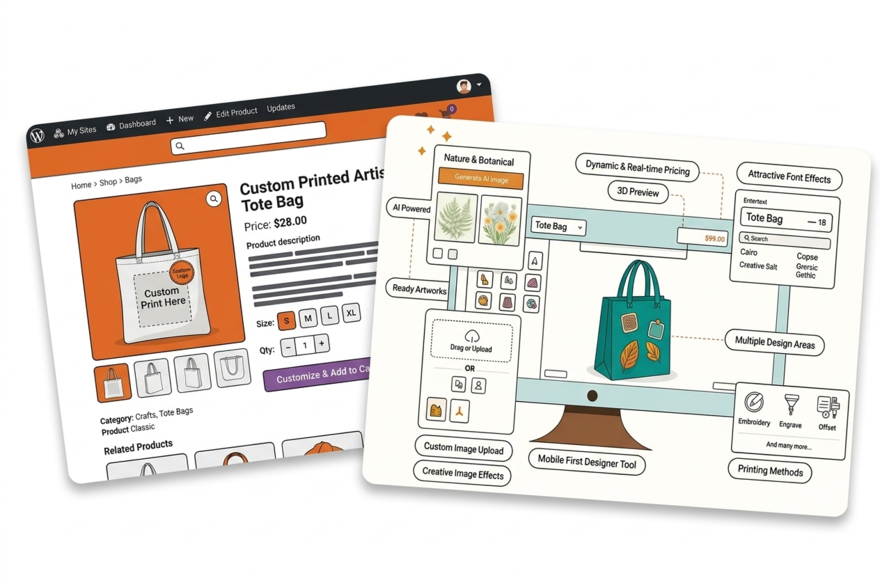
Add PrintXpand's AI-powered product designer to your WooCommerce store as a WordPress plugin. Customers design custom products directly on product pages — upload artwork, use AI generation, add text. Print-ready file output attached to every WooCommerce order.






Where WooCommerce Print Stores Run Into Trouble
Your Design Plugin Conflicts With Everything Else
A WooCommerce store running 25 plugins is normal. Add a product designer and it conflicts with your caching plugin, page builder, or checkout extension. Three vendors, three support queues, nobody owns the problem.
✓ PrintXpand's WooCommerce plugin is theme-agnostic and cache-compatible — tested against WooCommerce core updates before each release
WooCommerce Variants Don't Handle Print Complexity
WooCommerce variable products handle colour and size. They can't handle print-specific configuration: quantity-based pricing per decoration method, zone-based pricing for multi-location print, or upload-required products. Customers end up calling in to order.
✓ PrintXpand adds a full print configuration layer on top of WooCommerce — quantity breaks, print method pricing, and upload validation in one product page
Shared Hosting Kills Customisation Page Performance
Heavy server-side rendering on shared hosting means your customisation page loads in 4-6 seconds. Conversions drop sharply after 3 seconds. Moving to dedicated hosting adds cost most small print shops don't have in the budget.
✓ PrintXpand's designer runs client-side — all rendering happens in the browser, so your hosting server carries no extra load
Full Design Tool Capabilities Inside WooCommerce
AI Image Generation
Customers generate custom artwork using AI — directly in the design tool. No external tools, no copy-paste workflows.
Artwork Upload & Validation
Upload JPG, PNG, SVG, PDF, AI files. Auto-validation checks resolution, dimensions, and color mode for print readiness.
Variable Product Support
Design areas adapt per WooCommerce variation — different print zones for different sizes, colors, and materials.
Text, Fonts & Templates
200+ fonts, curved text, design templates. Customers personalise pre-built templates or design from scratch.
Real-Time Pricing
Pricing updates live as customers configure — size, color, quantity, design elements. Syncs with WooCommerce cart.
Print-Ready Output
PDF, PNG, SVG, AI — auto-generated with correct bleed, CMYK, and DPI. Attached to WooCommerce order details.
4 Steps to Add the Product Designer to WooCommerce
Install the Plugin
Assign to Products
Configure & Brand
Accept Custom Orders
Go Limitless with
Online Product Design
Software
Whether you sell tees, pants, gifts, or cards, the online product customisation tool ensures a seamless customisation experience for every item.
Real Results with PrintXpand.
“We tried three WooCommerce design plugins before PrintXpand. All three conflicted with our caching setup. PrintXpand installed cleanly, worked with our theme, and produced print-ready files automatically.”
“We integrated PrintXpand and saw a 40% increase in completed custom orders within the first month. Customers design in-browser — we eliminated most pre-press rework.”
Add the Product Designer to Your WooCommerce Store
Free POC with your WordPress products and branding — live in days, not months.