Shopify Product Designer Tool
Design. Preview. Order. All Inside Shopify.
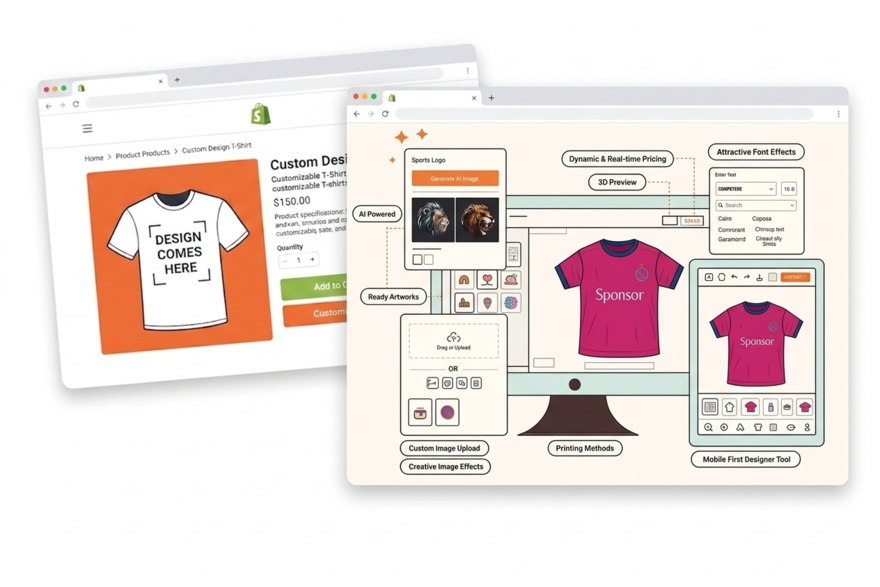
Add PrintXpand's AI-powered product designer to your Shopify store. Customers design custom products directly on your product pages — t-shirts, mugs, business cards, signage. Print-ready file output, real-time pricing, and zero redirects.






Why Shopify Print Stores Hit a Wall Before They Scale
The 100-Variant Limit Breaks Your Print Catalog
A hoodie with 8 sizes, 12 colours, and 3 print methods is 288 variants. Shopify hard-caps at 100. Most stores split one product into multiple listings — breaking inventory sync and confusing customers who see the same item three times in search results.
✓ PrintXpand bypasses the limit entirely — product configuration happens in the designer layer, not in Shopify's native variant system
Shopify Design Apps Don't Output Print-Ready Files
Most Shopify customiser apps let customers add text and images. None output CMYK at 300dpi. Your production team gets a 72dpi RGB PNG after the order is already confirmed. Someone has to manually rework every file before it goes to press.
✓ Every design from PrintXpand is print-ready: CMYK, 300dpi, bleed, cut lines — no manual intervention between checkout and production
No Artwork Proofing Between Cart and Production
A customer uploads a low-res photo, approves the preview, checks out. Your printer rejects the file. You email the customer, wait 48 hours for a re-upload, and the whole order is delayed. There's no preflight step between your Shopify cart and your press.
✓ Built-in DPI check, bleed validator, and digital proof approval before the order reaches production
Full Design Tool Capabilities Inside Your Shopify Store
AI Image Generation
Customers generate custom artwork using AI prompts — integrated directly in the design tool. No external tools needed.
Artwork Upload & Validation
Customers upload JPG, PNG, SVG, PDF, AI files. Auto-validation checks resolution, size, and color mode before production.
Multi-Zone Design
Front, back, sleeve, pocket — each zone gets its own design layer. Customers design multiple surfaces in one session.
Text & Font Tools
200+ fonts, curved text, outlines, shadows. Customers add text with real-time preview on the product.
Print-Ready File Output
PDF, PNG, SVG, AI — automatically generated with correct bleed, CMYK, and resolution. Attached to Shopify orders.
Mobile-Optimized
Full design capabilities on mobile and tablet. Touch gestures for zoom, rotate, and position. No functionality lost.
4 Steps to Add the Product Designer to Your Shopify Store
Install the App
Configure Products
Customise the Experience
Go Live
Go Limitless with
Online Product Design
Software
Whether you sell tees, pants, gifts, or cards, the online product customisation tool ensures a seamless customisation experience for every item.
Real Results with PrintXpand.
“We hit Shopify's 100-variant wall on every new product. PrintXpand's designer layer removed that ceiling entirely. Custom orders went up 35% in the first month because customers could finally configure what they actually wanted.”
“Every other Shopify design app sent us 72dpi PNGs. PrintXpand outputs print-ready CMYK files automatically. Our production team stopped touching artwork. The free POC had everything working in 3 days.”
Add the Product Designer to Your Shopify Store Today
Free POC with your Shopify products and branding — live in days, not months.