Web-to-Print for Packaging Companies
Custom Boxes. Labels. Folding Cartons. 3D Preview.
Let customers configure custom packaging online — select box style, enter dimensions, design on the dieline, and preview in 3D before ordering. Instant pricing based on dimensions, material, quantity, and finishing. Orders flow directly into your Print MIS/ERP with die-cut ready files. No manual quoting. No structural errors.






Why Packaging Companies Lose Deals to Slow Quoting
Complex Structural Design
Every packaging order requires a precise dieline — fold lines, glue tabs, bleed zones, and structural integrity all depend on exact dimensions. Customers send sketches or rough specs and your structural team manually creates each dieline. One error means reprinting thousands of units.
✓ Dieline configurator auto-generates structurally correct templates from customer dimensions — fold lines, tabs, and bleeds included
Manual Quoting Delays
Custom packaging quotes require calculating material usage based on dimensions, factoring in die costs, finishing (spot UV, foil, embossing), and quantity tiers. Each quote takes 30 minutes to an hour. Customers requesting quotes from three suppliers go with whoever responds first.
✓ Real-time pricing engine calculates based on dimensions, material, finishing, and quantity — customers see pricing instantly
No Self-Service Ordering
Customers cannot visualise their finished packaging without a physical sample or expensive 3D render. They order, wait for a proof, request changes, and the cycle repeats. Every round adds days. Small and medium orders become unprofitable from the labour alone.
✓ 3D Box Preview shows artwork on folded packaging in real time — customers approve visually before ordering
The Platform Stack for Packaging Businesses
Dieline Configurator Key
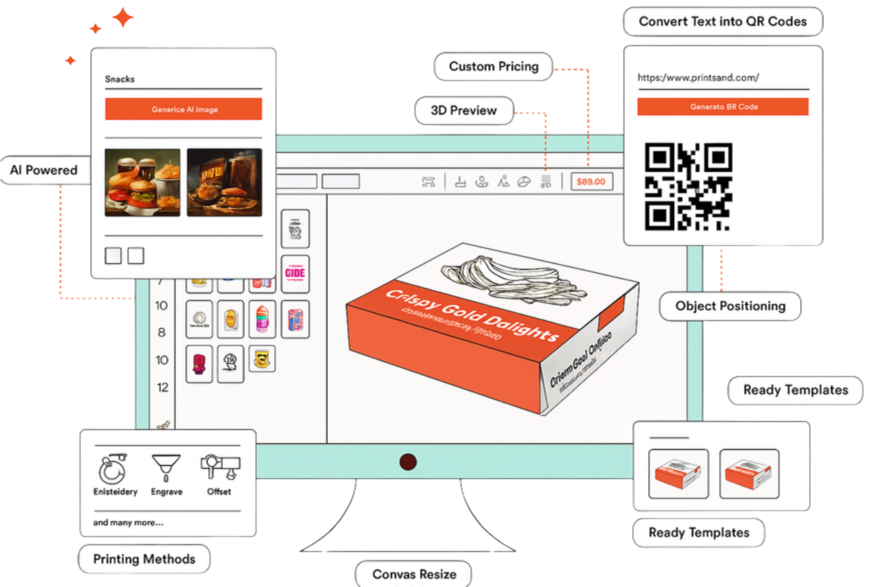
Customers select box style (tuck end, mailer, display, sleeve, pillow, etc.), enter custom dimensions, and the platform auto-generates a precise dieline with fold lines, glue tabs, and bleed zones. Design directly on the flat dieline with a live 3D preview of the assembled box.
Explore Dieline Configurator Key →3D Box Preview
Real-time 3D rendering of the customer's artwork on the folded box. Rotate, zoom, inspect every panel. Design changes update the 3D preview instantly. Customers see exactly what they are ordering — no physical samples, no surprises at delivery.
Explore 3D Box Preview →eCommerce Store
Sell custom packaging online with product catalogs organized by box style. Configurable options: material (corrugated, folding carton, rigid), finishing (spot UV, foil stamping, embossing, lamination), and quantity tiers. Real-time pricing from configurator to checkout.
Explore eCommerce Store →Print MIS / ERP
Every packaging order creates a job ticket with dieline specs, material requirements, finishing instructions, and quantity. Schedule across digital presses, die-cutting machines, folding/gluing stations, and finishing lines. QR-based shop-floor tracking from print to packed and shipped.
Explore Print MIS / ERP →Product Designer
Full design tool for packaging artwork — text, images, logos, patterns, and AI-generated artwork placed on dieline templates. CMYK workflow, bleed enforcement, and print-ready output. Customers design in-browser without needing structural packaging knowledge.
Explore Product Designer →PX Connect
Source packaging materials — corrugated board, folding carton stock, specialty papers — from vendors via PX Connect's supply chain network. Real-time pricing and availability. Automated purchasing for recurring material needs.
Explore PX Connect →From Custom Box to Production in 3 Steps
Customer Configures Online
Die-Ready File & Job Creation
Print, Die-Cut & Ship
Real Packaging Results.
“"The 3D box preview was a game changer for our sales process. Customers used to request physical samples for every new design — that alone cost us thousands per month. Now they rotate and inspect their packaging in 3D before ordering. Sample requests dropped by 80%."”
“"We specialise in small-run custom boxes for e-commerce brands. Before PrintXpand, the quoting and structural design for small orders was too costly to handle. The dieline configurator made small orders profitable — customers self-serve and we just produce."”
See PrintXpand Running on Your Box Styles & Packaging
Free POC in days, not months — with your box styles, materials, and finishing options. Cloud or On-Premise.