Odoo Product Designer Tool
Design. Customise. Order. Print.
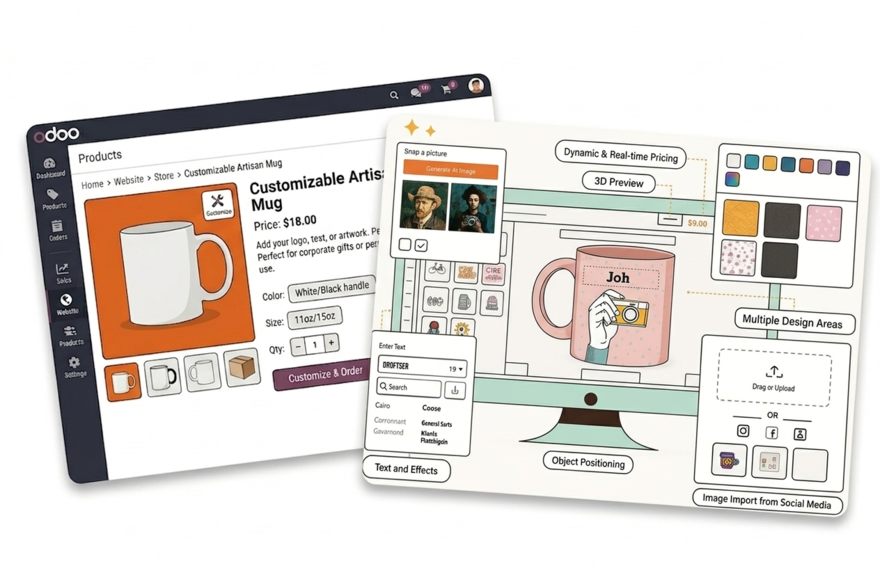
Add PrintXpand's AI-powered product designer to your Odoo store. Customers design custom products in-browser — t-shirts, business cards, signage, packaging — with real-time pricing and print-ready file output. No replatforming required.






Where Odoo's Native eCommerce Falls Short for Print Businesses
Odoo eCommerce Has No Print Product Configuration
Odoo's eCommerce module handles standard product variants well. It has no concept of print-specific configuration: decoration method selection, print area zones, quantity-based print pricing, or upload-required products. Customers who need to customise an order call or email instead of checking out.
✓ PrintXpand adds a full product personalisation layer to your Odoo eCommerce store — customers configure and approve their design before the order reaches your production team
Odoo Pricelists Don't Handle Print Pricing Logic
Odoo's pricelist model handles quantity discounts and customer group pricing. Print pricing is more complex: it depends on the product, the decoration method, the number of print colours, the quantity ordered, and finishing options. None of this maps cleanly to Odoo's standard pricing model.
✓ PrintXpand's pricing engine handles print-specific cost logic and passes confirmed pricing back into the Odoo order flow
No Artwork Management or Proof Approval in the Order Flow
Odoo manages orders and invoicing well. It has no native artwork upload, proof review, or customer approval step. For print businesses, this means customer-approved artwork is managed in email threads and shared drives — completely disconnected from the order record in Odoo.
✓ PrintXpand handles artwork upload, customer proof approval, and file validation — the approved print-ready file is attached to the Odoo order automatically
Odoo Product Designer Features
AI-Powered Design Tool
Browser-based product designer with AI image generation, template library, text editing, and clipart. No software installation needed.
Native Odoo Extension
Install as a standard Odoo module. Works with your existing theme and product catalog out of the box. No custom development.
Real-Time Pricing Engine
Price updates dynamically as customers add colors, change sizes, or select materials. Element-based pricing with quantity breaks.
Print-Ready File Output
Generates production-ready PDF, PNG, SVG, and AI files with correct DPI, bleed, and color profiles. Routes to production automatically.
Mobile-Optimized Designer
Full design experience on smartphones and tablets. Responsive canvas with touch gestures for mobile customers.
Template Locking
Lock design areas, colors, fonts, and elements for brand compliance. Corporate buyers customise within approved boundaries only.
Odoo Integration in 4 Steps
Install the Module
Configure Products
Customers Design & Order
Files to Production
Go Limitless with
Online Product Design
Software
Whether you sell tees, pants, gifts, or cards, the online product customisation tool ensures a seamless customisation experience for every item.
Real Results with PrintXpand.
“Our Odoo eCommerce had no way to handle print product configuration. Customers couldn't customise online so they called in. PrintXpand added the personalisation layer — online custom orders went from near zero to 60% of our total volume.”
“Odoo's pricelists couldn't model our print pricing. PrintXpand's engine handled decoration method rates, quantity breaks, and setup fees — and passed confirmed pricing straight back into the Odoo order. Manual quoting dropped by 80%.”
Ready to Add Product Design to Your Odoo Store?
See the designer running on your Odoo products — free POC in days, not months.