BigCommerce Product Designer
Design. Preview. Order. All Inside BigCommerce.
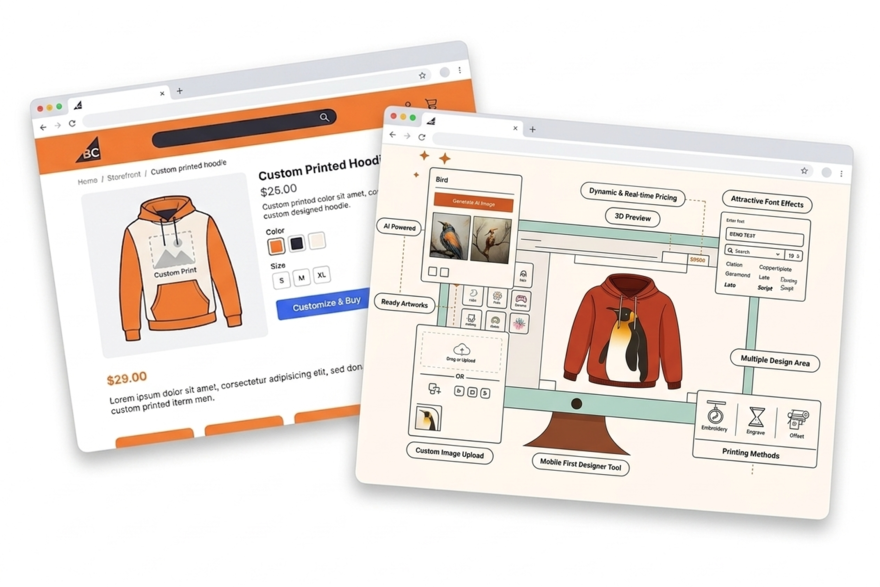
Add PrintXpand's AI-powered product designer to your BigCommerce store. Customers design custom products directly on your product pages — apparel, promotional items, business stationery, signage. Print-ready file output, real-time pricing, and headless commerce support.






Where BigCommerce B2B Ends and Your Print Business Begins
BigCommerce Price Lists Don't Understand Print
BigCommerce B2B price lists work for fixed-price products. Print pricing depends on what the customer configures — print method, ink colour count, print area, finishing options. None of those variables feed into a price list. Your team quotes manually for every order.
✓ PrintXpand adds a print-aware pricing engine on top of BigCommerce — quantity breaks, decoration method rates, and setup fees calculated at the product level
Almost No Product Personalisation Apps for BigCommerce
BigCommerce merchants looking for a product designer have fewer options than on any other major platform. Most generic apps don't output print-ready files, don't support multi-zone decoration, and have no connection to a production system.
✓ PrintXpand connects your BigCommerce store to print-ready file output and your production workflow — no manual steps between customer design and production
Your Quote Workflow Stops at Price Negotiation
A print broker needs artwork review, revision tracking, proof approval, and production cost estimation inside the quote flow. BigCommerce's native RFQ module handles price negotiation only — it has no concept of artwork or print specifications.
✓ PrintXpand's RFQ module layers artwork upload, proof approval, and print spec management on top of BigCommerce's native B2B quoting
Full Design Tool Capabilities Inside BigCommerce
AI Image Generation
Customers generate custom artwork using AI prompts — integrated directly in the design tool. No external tools needed.
Artwork Upload & Validation
Upload JPG, PNG, SVG, PDF, AI files. Auto-validation checks resolution, size, and color mode before production.
Multi-Zone Design
Front, back, sleeve, pocket — each zone gets its own design layer. Customers design multiple surfaces in one session.
Text & Font Tools
200+ fonts, curved text, outlines, shadows. Real-time preview on the product with full text formatting controls.
Print-Ready File Output
PDF, PNG, SVG, AI — automatically generated with correct bleed, CMYK, and resolution. Attached to BigCommerce orders.
Mobile-Optimized
Full design capabilities on mobile and tablet. Touch gestures for zoom, rotate, and position. No functionality lost.
4 Steps to Add the Product Designer to BigCommerce
Install the App
Configure Products
Customise the Experience
Go Live
Go Limitless with
Online Product Design
Software
Whether you sell tees, pants, gifts, or cards, the online product customisation tool ensures a seamless customisation experience for every item.
Real Results with PrintXpand.
“BigCommerce's B2B features got us so far. But print pricing — by method, by colour count, by quantity — was impossible to model. PrintXpand handled that entirely. Custom product revenue grew 40% in two months.”
“We run a headless BigCommerce setup. PrintXpand integrated via API in under a week. Print-ready files attach to every order automatically. Our print brokers can finally quote with artwork specs inside BigCommerce.”
Add the Product Designer to Your BigCommerce Store Today
Free POC with your BigCommerce products and branding — live in days, not months.